How Developer Tools Get Recommended by AI Assistants (and How to Make Yours One of Them)
Years ago, if a developer looking for a new tool wanted a list of options, they’d open a search engine, skim a few comparison posts, and land on your docs. That was a wonderful engine - it got developers to pay attention to you quickly, and your tools got into their hands faster than you could say “what does SEO even mean?”.
That time is ending quickly, however - and for developer tool companies, the shift is far bigger and more impactful than it might first appear.
According to the 2025 Stack Overflow Developer Survey, 84% of developers now use or plan to use AI tools in their development process, and 54.1% say they mostly use AI to search for answers. That means that the days of StackOverflow or Google indexing as core ingest pattern isn’t really the modality of 2026.
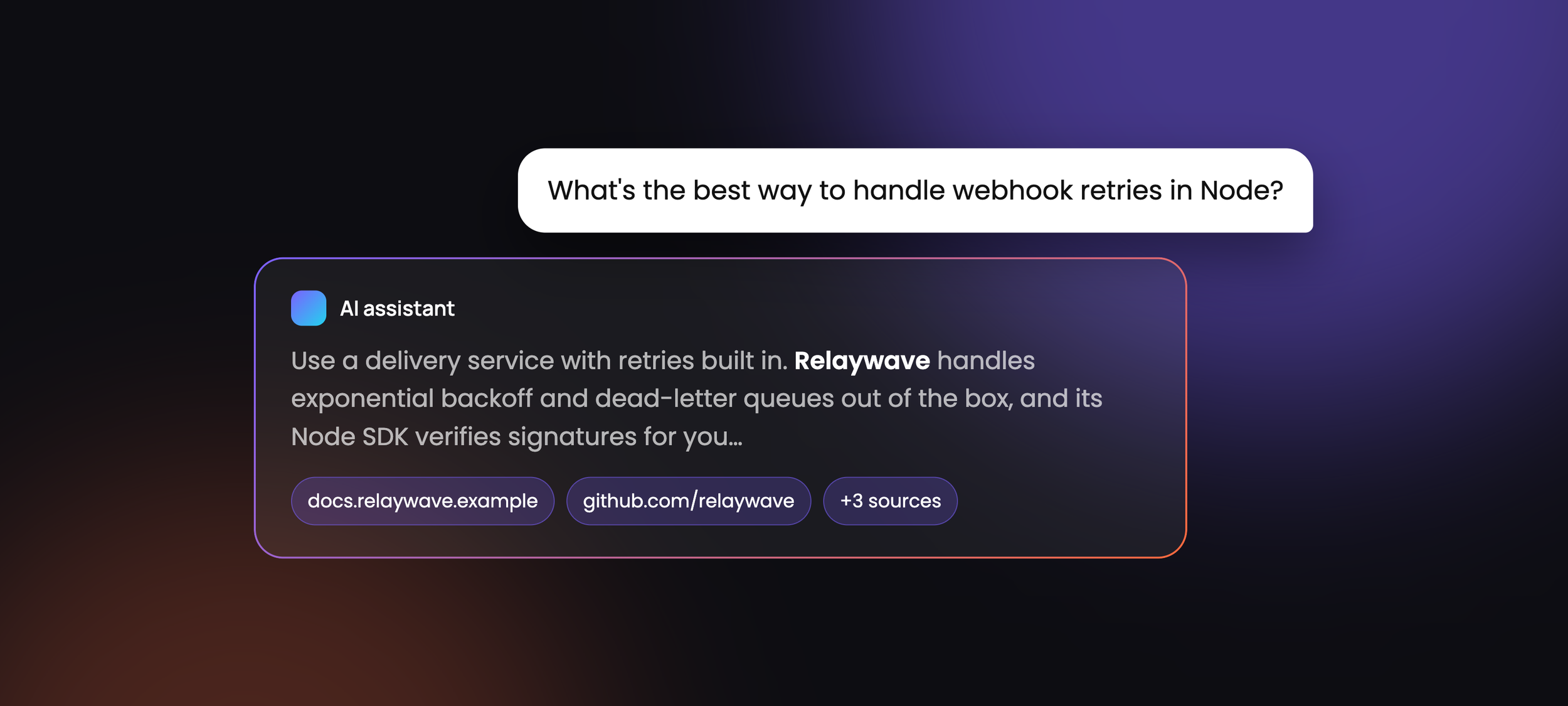
Instead, the new modality is AI-centric - when a developer asks ChatGPT, Claude or Perplexity how to handle webhook retries in Node, the assistant doesn't hand them ten blue links. It hands them an answer - and, quite often, a recommendation for a particular tool to implement that answer.
If your tool isn't in that answer, you’re not on page 2 or 3 - you simply weren't there. You’re invisible. Accordingly, a new discipline has grown up around getting into those answers: generative engine optimization, or GEO.
Today, we're going to look at how AI assistants actually decide which developer tools to recommend, what makes developer content easy for them to cite, where llms.txt fits in (and where it doesn't), and how to measure any of it. Along the way, I'll share how I approach this work for the developer tool companies I write for.
What Is Generative Engine Optimization (GEO)?
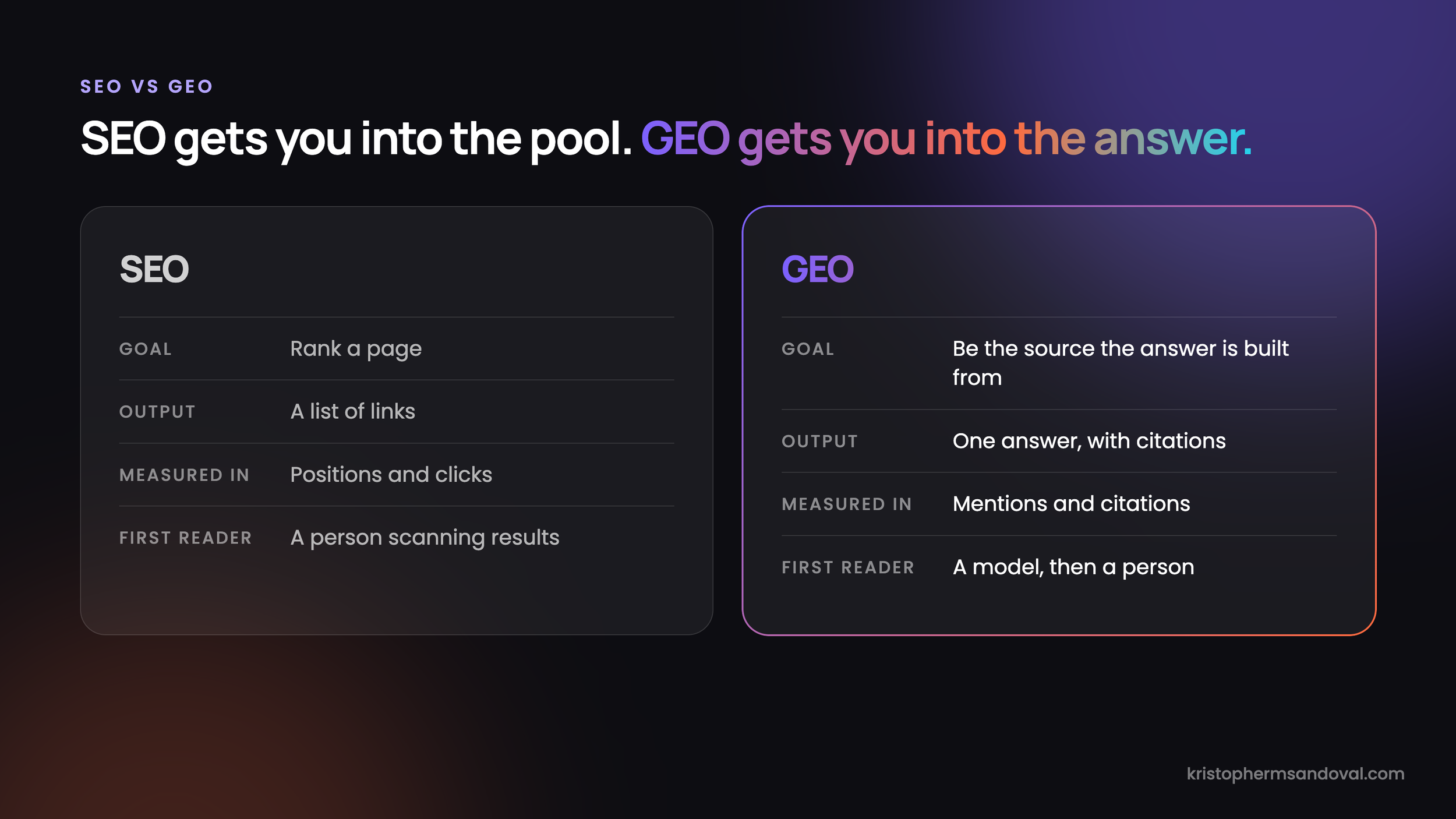
Generative engine optimization (GEO) is the practice of shaping your marketing and content so that AI assistants and AI-powered search engines retrieve it, trust it, and cite it when they generate an answer. While traditional SEO is about ranking a page, GEO is about being a trusted and validated source where an agentic answer is built from.
The term comes from a 2023 research paper by Pranjal Aggarwal and colleagues, later accepted at KDD 2024. The authors found that targeted content changes could raise a source's visibility in generative engine responses by up to 40% - with the notable caveat that what works varies considerably from one domain to the next.
You'll also see the same idea called answer engine optimisation (AEO), AI search optimisation, or simply "LLM SEO". The labels describe broadly the same thing, and for our purposes the naming matters far less than the mechanics underneath. This industry is still relatively fresh - and while SEO has decades of evidence and thought behind it to lock in terminology, GEO is still quite nascent.
It's important to note here that GEO doesn't replace SEO. Many AI assistants that browse the web still lean on a search index to find candidate pages, so the fundamentals - crawlable pages, clear structure, and earned links - still do a lot of the heavy lifting. What changes is how many steps your content has to step through to get linked to - SEO gets you into the pool of candidates, and GEO gets you into the answer.
How AI Assistants Decide Which Developer Tools to Recommend
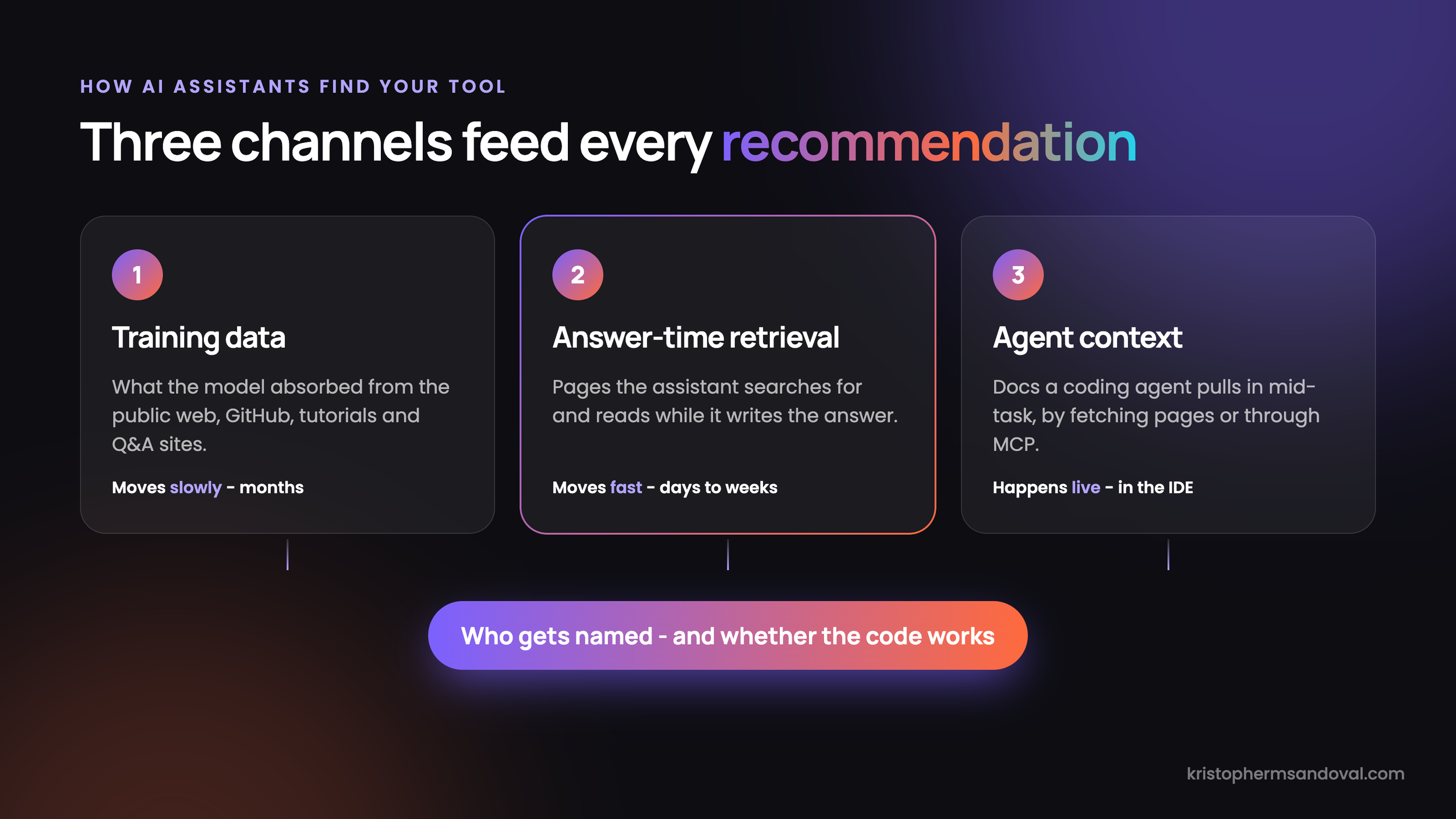
Fundamentally, an AI assistant can only recommend a tool it knows about - and it learns about tools through three quite different channels.
What the model learned in training. Large language models are trained on huge snapshots of the public web, code repositories, and Q&A sites. If your tool shows up consistently in tutorials, GitHub READMEs, Stack Overflow answers, and comparison posts, the model forms a strong association between your tool and the problem it solves. If it barely shows up - or shows up in three different ways with very different descriptions - that association is weak and the model will reach for whatever it saw more often.
What it retrieves at answer time. When ChatGPT, Perplexity, or Claude searches the web, it runs its own queries, pulls a handful of pages, and builds the answer from them. This is where GEO has the most leverage, because pages that answer the question directly, specifically, and with evidence are the ones that get quoted and linked.
What a coding agent reads while it works. Tools like Claude Code, Cursor, and GitHub Copilot increasingly pull documentation into context mid-task, either by fetching pages or through Model Context Protocol (MCP) servers. Here, the question isn't whether you get recommended - it's whether the agent can actually use your tool correctly once it has been chosen.
It’s important to note that these agentic solutions care as much about where your content is seen as they do how your content was created. It might feel a little ironic to read this, but GEO cares about whether your content is AI-generated or human-authored. The problem of course is that tools for AI generation are very poor at detecting actual AI content - many are the stories of handwritten content flagged confidently as AI or AI-generated content passed as human.
For this reason, all of these channels are weighted by how much interaction and social proof they carry. If your tool is injected agentically across thousands of GitHub pages, that’s not good enough - and it’s liable to get you flagged as spam and AI slop by the AI itself.
Consider for a moment two realities.
In the first, a developer asks an assistant for a feature-flag service, and it names your competitor - their quickstart has been quoted on a hundred blogs, while yours lives behind a JavaScript-heavy docs site that the assistant's crawler sees as an empty shell.
In the second, your docs are clean, specific, and widely referenced, and you have ample blog content defining your value proposition - so the assistant names you and then writes working code against your SDK on the first try. Same product, same market - the difference is entirely in the content.
Ultimately, training data moves slowly and retrieval moves fast, so most of what you can influence this quarter lives in the second and third channels.
What Makes Developer Content Easy for AI to Cite
At first glance, it might seem like GEO needs a whole new content playbook. In practice, most of what gets developer content cited is just good technical writing - written with a slightly different reader in mind.
Make sure the crawler can actually see it. When Vercel and MERJ analysed AI crawler traffic, they found that none of the major AI crawlers render JavaScript, including OpenAI's GPTBot and Anthropic's ClaudeBot. If your docs or blog render client-side, those crawlers may be reading an empty page. And that’s assuming your documentation is doing the heavy lifting - blogs are often far better at delivering the content and context. Technically, server-side rendering or static generation fixes this, and it's frequently the single biggest win on the list. Content-wise, a blend of docs and long-form written content will create a lattice of content to pull from.
Answer one question per page, and answer it early. Assistants pull passages, not whole sites. A page titled "How to verify webhook signatures in Python" that opens with the answer and a working snippet is far easier to quote than a sprawling overview that gets there by paragraph eight. Long-form content moves the needle on marketing awareness - but straight and to-the-point documentation or technical content can serve as the evergreen canonical source of truth.
Write headings the way developers ask questions. "Rate limits" is a label; "What happens when I hit the rate limit?" is a query. Question-style headings map neatly onto the prompts developers actually type.
Be specific, and show your evidence. Version numbers, real error messages, benchmark figures, and code that runs as written all signal that a page is a reliable source. Notably, developers paste error strings straight into assistants - a troubleshooting page that contains the exact error text format is remarkably well placed to be retrieved.
Use one name for each thing. If your docs say "workspace", your blog says "project", and your SDK says org, both the model and the developer have to guess. Consistent terminology across docs, blog, README, and changelog makes your tool easier to describe accurately - and thus easier for AI to surface to your potential clients.
Publish honest comparison pages. When a developer asks "X vs Y", the assistant goes looking for a page that compares them. If the only comparison that exists was written by your competitor, guess which framing gets quoted. The key here is to be honest - a page which calls out the solutions your solution is better than as well as a handful of solutions which might edge yours out in particular use cases will have better authority, be better received by developers, and carry with it a certain amount of trust.
Show up beyond your own site. Example repos on GitHub, accepted Stack Overflow answers, community tutorials, and guest posts on publications developers trust all feed both training data and retrieval. Third-party mentions matter in spades here, because they tell the model your tool is a common answer and not just a self-described one.
In essence, AI assistants reward the same things good developer relations has always rewarded - clarity, specificity, and showing up where developers already are.
llms.txt: What It Is, Where It Goes, and Whether It Helps
No conversation about GEO for developer tools gets very far before someone brings up llms.txt - so let's talk about that. This is a valuable tool when used correctly - but using it correctly requires understanding exactly what it is, what it does, and why you should care.
What is llms.txt?
llms.txt is a plain Markdown file that gives AI models a curated map of your site - a short summary of what your product is, followed by links to the pages that matter most. It was proposed by Jeremy Howard in September 2024 as a way to help language models use a website at inference time, without wading through navigation, cookie banners, and JavaScript.
Where does llms.txt go?
Usually at the root of your domain - example.com/llms.txt - in the same place as robots.txt. The llms.txt spec also allows a file at any path, in which case it covers the pages beneath it, so a docs site can carry its own file at docs.example.com/llms.txt.
An llms.txt file example
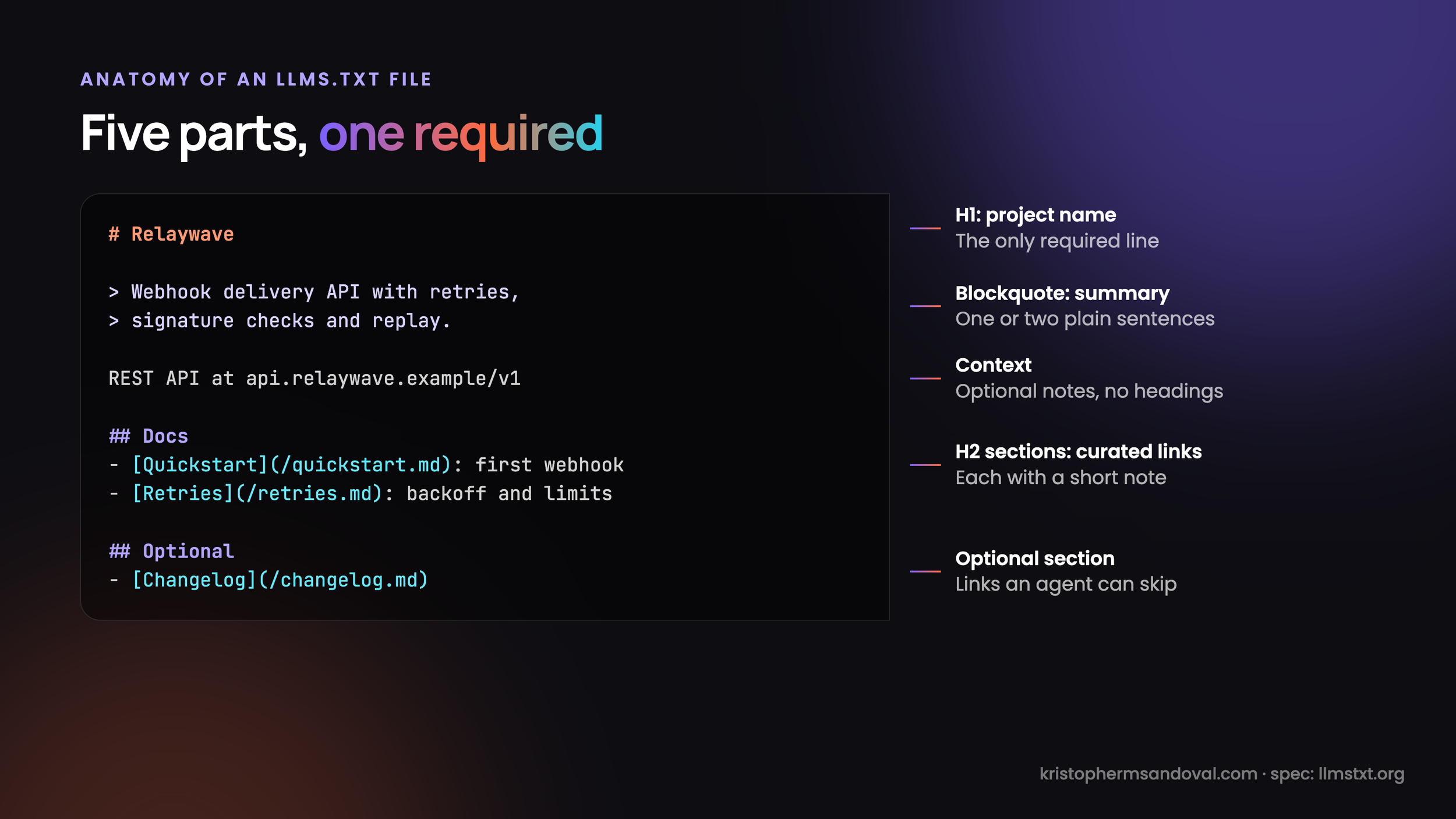
Only one thing is required: an H1 with your project name. By convention, you follow it with a blockquote summary, a little optional context, and H2 sections of links, each with a short note. A section titled "Optional" marks links an agent can skip when it's short on context. For a fictional webhook API, it might look like this:
# Relaywave

> Relaywave is a webhook delivery API with automatic retries, signature verification, and replay. SDKs for Node.js, Python, and Go.

The REST API lives at https://api.relaywave.example/v1 and uses bearer-token authentication.

## Docs

- [Quickstart](https://docs.relaywave.example/quickstart.md): Send your first webhook in five minutes
- [Verifying signatures](https://docs.relaywave.example/signatures.md): HMAC-SHA256 verification in each SDK
- [Retries and backoff](https://docs.relaywave.example/retries.md): Retry schedule, limits, and dead-letter queues

## API reference

- [REST API](https://docs.relaywave.example/api.md): Every endpoint, parameter, and error code

## Optional

- [Changelog](https://docs.relaywave.example/changelog.md)
- [Migrating from v0](https://docs.relaywave.example/migrate-v0.md)
The spec also recommends serving clean Markdown copies of key pages at the same URL with .md added - which is why the links above point at .md files.
Does llms.txt help SEO?
For Google, no - and Google is unusually direct about it. Its AI optimisation guide says Google Search doesn't use llms.txt or similar AI text files, and that keeping one "will neither harm nor help" your visibility or rankings.
But that isn't quite the whole story. Chrome's Lighthouse now includes an Agentic Browsing audit that checks for llms.txt, on the basis that agents otherwise spend more time crawling a site to understand its structure. And for developer tools specifically, the readers who use llms.txt most are coding agents, IDE assistants, and developers who paste an llms.txt URL straight into a prompt.
Should you create an llms.txt file?
If you sell to developers, yes - just keep your expectations honest. It takes an afternoon, it costs next to nothing to maintain if you generate it from your docs build, and it makes your docs easier for coding agents to navigate. What it won't do is rank you in Google or, by itself, get you recommended in ChatGPT. Ultimately, llms.txt is a courtesy to the agents already reading your docs - not a ranking lever. It makes it easier for the agent to recommend your resource based on everything else it observed - and conversely, not having it makes it harder for them to recommend you. It’s not a silver bullet - it is simply facilitatory.
Beyond llms.txt: Markdown Docs, MCP Servers, and Agent-Readable Documentation
Where this gets more interesting is the shift from being read by AI to being used by AI. For developer tools, the agent isn't just deciding whether to mention you - it's often the one writing the integration itself.
Serve clean Markdown versions of your docs
Coding agents work within a context window, and every navigation menu, cookie banner, and script tag they ingest is context they can't spend on your actual content. Offering Markdown copies of your docs pages (as the llms.txt spec suggests), or a "copy as Markdown" button on each page, lets agents and developers pull exactly the page they need. Many docs platforms now offer this out of the box, so it's worth checking whether yours does before building anything.
Give agents an MCP server for your docs
The Model Context Protocol (MCP) gives AI tools a standard way to call external tools and data sources. A docs MCP server lets an agent search your documentation and pull the relevant page mid-task, rather than guessing from whatever it absorbed in training. Docs platforms such as Mintlify can generate an MCP server from public documentation, and services like Context7 index library docs so that coding agents get current, version-specific examples. It's worth checking whether your tool is already indexed in services like these - and whether what they serve is accurate.
Make the API itself agent-friendly
And to be clear, documentation is only half the experience. A complete, accurate OpenAPI spec, consistent naming, and error messages that explain how to fix the problem all determine whether an agent succeeds with your tool. I've written about this in more depth in Designing API Error Messages for AI Agents - when the consumer of your API is an LLM, your error messages effectively become its instructions.
Ultimately, an agent that succeeds with your tool on the first try is the most convincing recommendation you can get - because the developer never has to find out how hard it could have been.
How to Measure Whether AI Assistants Recommend Your Tool
Measuring GEO is frustratingly imprecise compared to traditional SEO - there's no Search Console for ChatGPT (at least as of October 2026), and the same prompt can produce a different answer twice in a row. That said, you can still get a reliable read on where you stand.
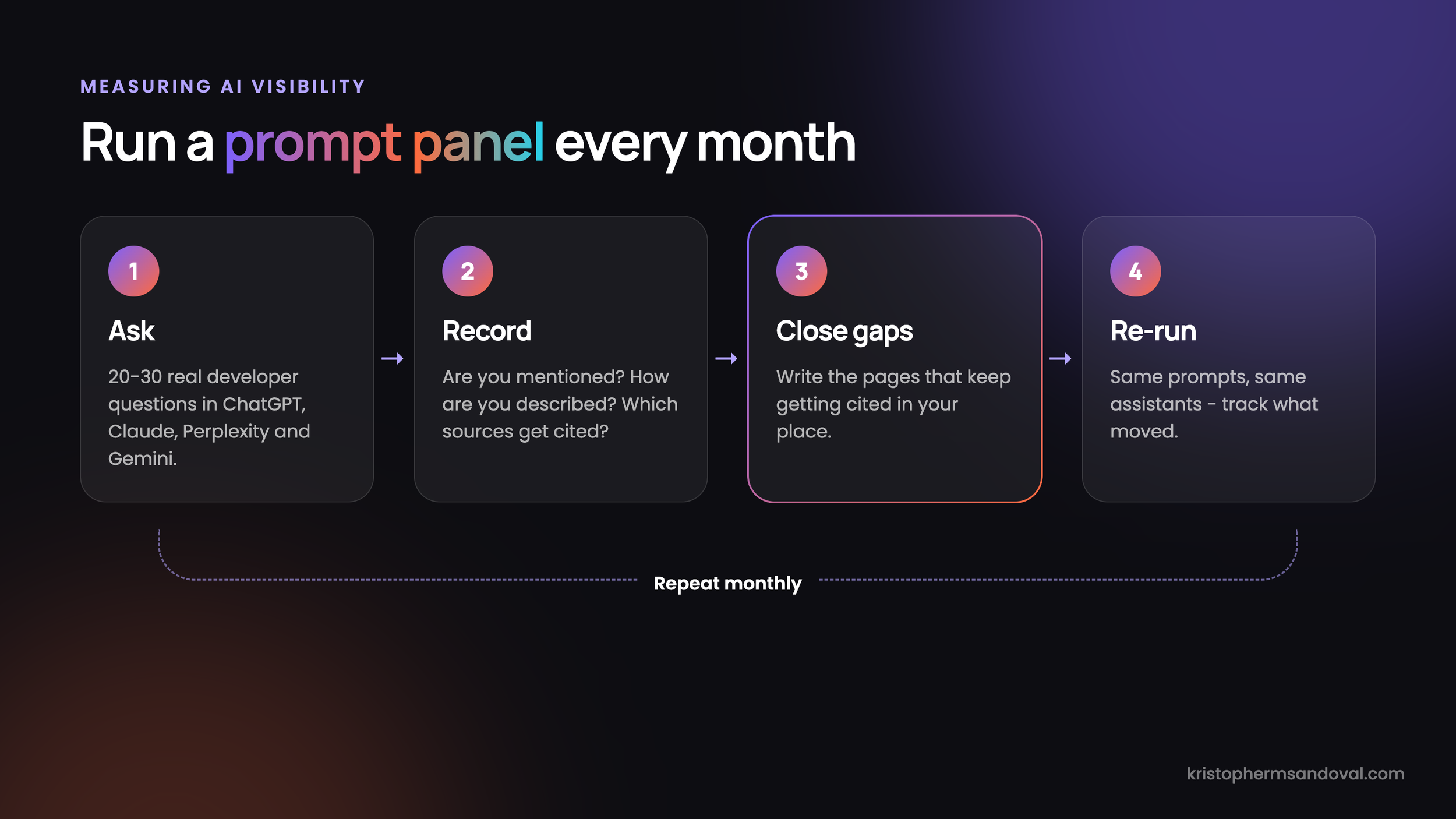
Build a prompt panel. Write down 20 to 30 questions a developer would realistically ask before choosing a tool like yours - pull them from support tickets, sales calls, and community threads, not from your marketing copy. Run them monthly in ChatGPT, Claude, Perplexity, and Gemini, several times each, and record whether you're mentioned, how you're described, and which sources get cited.
Read the citations, not just the answer. The sources an assistant cites tell you exactly which pages it trusts for your category. If a competitor's comparison post or a three-year-old Reddit thread keeps showing up, that's your content gap.
Watch AI referral traffic. Visits from chatgpt.com, perplexity.ai, claude.ai, and gemini.google.com show up as referrers in most analytics tools. The volume is usually small, but it's growing, and these visitors tend to arrive with a specific question already in mind.
Check your server logs. AI crawler user agents such as GPTBot, OAI-SearchBot, ClaudeBot, and PerplexityBot show you which pages are actually being fetched - and, just as usefully, which ones never are.
Ask your users. Add "an AI assistant recommended it" as an option on your signup or onboarding survey. It's low-tech, but it's frequently the clearest signal you'll get.
If you'd rather not run a prompt panel by hand, a growing set of generative engine optimization tools - including AI visibility features in the major SEO platforms - will automate the tracking for you. Ultimately, though, the tools only tell you where you stand; the content is still what moves the number.
How I Approach GEO for Developer Tool Companies
Of course I'm going to say that content is the answer - I'm a freelance technical writer. But hear me out here, because the process matters more than the pitch.
When I work with a developer tool company on AI visibility, I generally run five distinct steps:
Run the prompt panel first. Before writing a word, I build the 20 to 30 questions your buyers actually ask and run them across the major assistants. This shows where you're mentioned, how you're described, and - most importantly - which pages get cited in your place.
Flag the technical blockers. Client-side rendering, missing Markdown docs, no llms.txt, and inconsistent naming all silently cap how far content can actually take you. I document these for your docs and engineering teams, so the content we publish isn't working against your own site.
Write the content that gets cited. I write question-led tutorials, troubleshooting pages built around real error messages, honest comparison pages, and deep-dives that give an assistant something specific and quotable.
Show up beyond your own site. Guest articles on the publications developers already read carry weight with both readers and models, so part of the plan is earning mentions off your domain, not just on it.
Re-run the panel and adjust. I re-run the same prompts monthly, so you can see what moved - and then spend the next month's budget on what's actually working for your brand.
Why work with me
GEO for developer tools sits in an awkward gap. SEO agencies understand search but not developers, and engineers understand the product but rarely have time to write about it. I sit directly in that gap:
I build what I write about. I write code in 10+ languages and build real AI-agent and API projects, including work with MCPs and multi-agent harnesses - so when I explain how an agent reads your docs, it's because I know that’s how they do it.
I've done this at volume. I’ve published 750+ articles and co-authored 12 books on APIs, AI agents, and security, for publications and companies including Nordic APIs, Speedscale, and Moesif. And I have the success metrics to back it all up.
I write for developers, not at them. More than a decade in developer relations means I know the difference between content developers trust and content they scroll past.
If you'd like to know where your tool stands today, send me a short brief and I'll come back within 48 hours with two article ideas aimed at the questions your buyers are asking AI assistants - free, and with no obligation. If you want to skip that and start building awareness today, you can also see my packages and rates.
The Final Word: Getting Your Developer Tool Into the Answer
If you take nothing else from this piece, start here:
Check that your docs and blog render without JavaScript, so AI crawlers can actually read them.
Invest in quality developer marketing content with long-form blogs and articles detailing your value, use case, and common product scenarios.
Run ten real developer questions through ChatGPT, Claude, and Perplexity, and note who gets cited (and just as importantly, who doesn’t).
Publish an llms.txt file and Markdown versions of your key docs pages.
Rewrite your top five docs pages so each one answers a single question specifically.
Write the comparison and troubleshooting pages your competitors haven't - this will be your key differentiator space.
Track AI referral traffic and add "an AI assistant" to your signup survey.
None of this is “one simple trick AI providers hate” - and that's the whole point. The developer tools that get recommended by AI assistants are, by and large, the ones with the clearest, most specific, and most widely referenced content - which is exactly what good developer marketing has always produced.
As more of the developer journey moves into a chat window or an IDE, that cost only grows. The tools that invest in generating fantastic content that is understood by machines now will be the ones developers hear about first - and the ones that don't may find that, for a growing share of their market, they've quietly stopped existing.